
Quick Answer: How Do You Create an Audiobook from Text for Free?
Split your book into chapters, lock one narrator voice for the entire project, generate chapter by chapter with a free TTS tool (up to 10,000 words per request on texttospeechh), proof-listen with read-along word highlighting, then name your MP3 files clearly. The whole process costs nothing — you pay in time, not money.
The part most guides skip: audiobooks are a different craft from voiceovers. Ten hours of audio punishes every shortcut. This guide covers the workflow that actually survives a full book.
1. What Makes an Audiobook Different from a Voiceover
A YouTube voiceover is three minutes long. An audiobook is ten hours. That difference breaks most free TTS tools in ways you will not notice until chapter 4:
- Consistency. Your narrator cannot suddenly change voice, speed, or accent in chapter 6. You lock one voice for the entire book and you do not touch the settings again. Write them down — future you will thank present you when chapter 14 needs regenerating.
- Long-form chunking. No browser tool swallows 100,000 words in one request. You generate chapter by chapter (or in 5,000–10,000-word chunks) and keep going until it is done.
- Pacing and pauses. Listeners need breathing room between paragraphs and chapters. Plain TTS runs everything together; audiobooks need deliberate silence. A beat of quiet is doing real work.
- Chapter structure. The finished file should be navigable — either one long MP3 with chapter markers or separate files per chapter, clearly named.
Any guide that skips these steps is not an audiobook guide. It is a voiceover guide in a trench coat.
2. The Free Audiobook Workflow, Step by Step
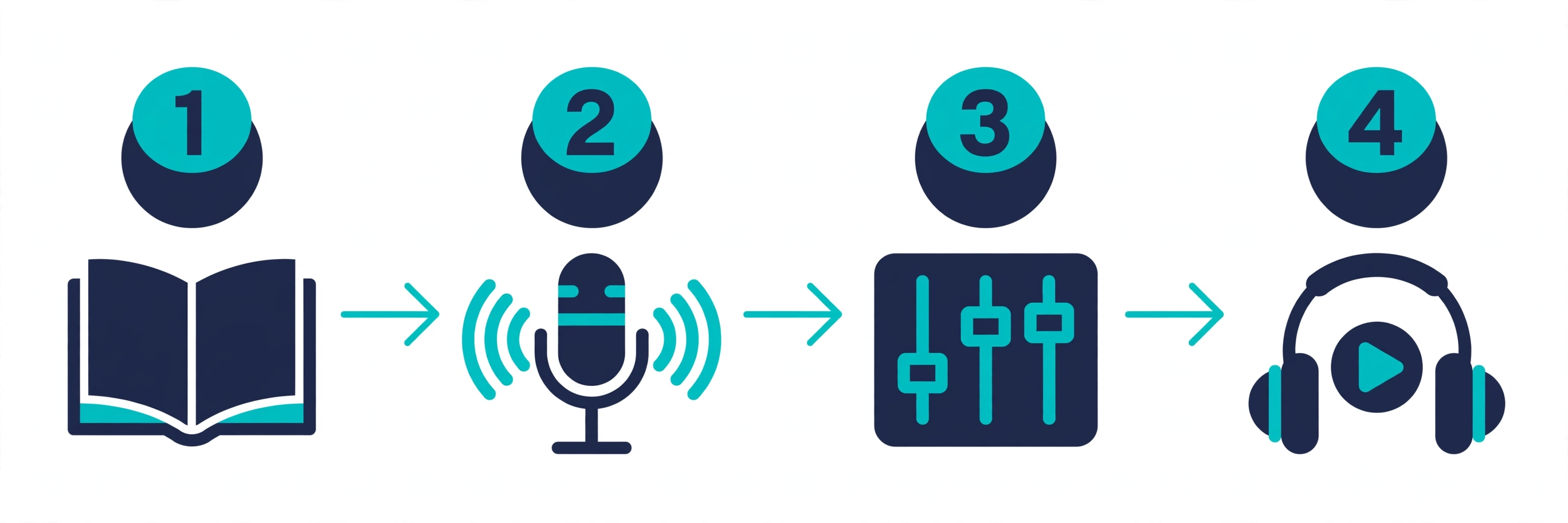
Step 1: Prepare your text before you touch any tool
Split your manuscript into chapters first. Strip out footers, page numbers, and formatting junk. If you are converting a PDF or DOCX, clean the extracted text — headers repeated on every page will get read aloud if you do not remove them, and discovering that at minute 40 of proof-listening is a special kind of pain.
Working with a public domain book? Project Gutenberg gives you clean text files, which makes this whole step nearly painless.
Step 2: Lock one voice for the entire book
This is the single most important decision you will make, and it is tempting to rush it. Do not. Generate a few minutes with two or three candidate voices, then actually listen — not 30 seconds, a real 10 minutes. A voice that charms you in a sample can grate on you by hour three. Once you choose, that is your narrator: same voice, same speed, same settings, all the way through. Not sure which voices are worth auditioning? Our best AI voices guide compares the top neural models, so you can shortlist candidates before committing to one for ten hours.
Step 3: Generate chapter by chapter
Paste one chapter at a time. Keep each generation under the tool's word limit — TextToSpeechH handles up to 10,000 words per request, which covers most chapters comfortably. Generate, listen to the first 30 seconds to catch anything weird, then download the MP3 and move on.
Where the narration should feel alive, add simple stage-direction tags: [cheerfully] for an excited passage, [sighs] for a weary one. Small cues, big difference — it is what separates “text being read” from “story being told.”
Step 4: Proof-listen with read-along highlighting
This is the step where most DIY audiobooks quietly die, because most people skip it. Do not. Listen to each chapter with the text in front of you — TextToSpeechH's read-along word highlighting follows the narration word by word, so mispronunciations and awkward pauses jump out at you instead of hiding in the audio. Fix the text, regenerate the chapter, move on. A five-minute fix now beats a one-star review later, every time.
Step 5: Assemble and name your files
Name every file clearly — my-book-chapter-01.mp3 — so they play in order on any device, no surprises. Optional but nice: add basic ID3 metadata (title, author, track number) with a free tag editor so it shows up properly in audiobook players instead of “Unknown Artist, Track 1.”
That is the whole process. Simple on paper — but each step exists because skipping it produces a noticeably worse book.
3. Free Tools That Actually Work for Audiobooks
Not every free TTS tool survives a full book. Here is the honest rundown:
| Tool | Cost | Word limit | Best for |
|---|---|---|---|
| texttospeechh (Free) | Free, no signup | 10,000 words/request | Full-book narration with read-along proofreading |
| ElevenLabs free tier | Free (limited) | ~10,000 chars/month | Testing premium voice quality on short books |
| TTSMaker | Free (limited) | 20,000 chars/week | Short stories and samples |
| Microsoft Edge Read Aloud | Free | No strict limit | Quick listening, no downloads |
The honest truth? Premium tools sound slightly better — but their free tiers run out mid-book. A free tool that lets you finish the whole project beats a premium tool that lets you finish chapter one. Every time.
Want the wider landscape of free options? See our roundups of the best free text-to-speech tools and the best AI voice generators.
4. The Traps: Rights, Quality, and Expectations
- Commercial rights. Your own writing and public domain works? Go wild. Narrating a copyrighted book you do not own the rights to — even with AI doing the talking — is still infringement. Do not.
- The 10-hour test. Listen to at least 10 minutes of your chosen voice before committing to a whole book. This is the cheapest insurance in the entire process.
- Robotic dialogue. AI narrators handle plain prose better than back-and-forth dialogue. If your book is dialogue-heavy, lean on stage directions and expect some regenerating. It is normal.
- AI disclosure. Audible and other platforms increasingly require you to disclose AI narration. Check the platform's current policy before you publish — the rules are genuinely still evolving in 2026, so verify, do not assume.
5. Frequently Asked Questions
Q1: Can I really make an audiobook for free?
Yes — for the narration itself. Tools like TextToSpeechH generate and export MP3s at no cost. You pay in time instead of money, mostly in text prep and proof-listening. Fair trade.
Q2: How long does it take to convert a book to audio?
A 100,000-word novel produces roughly 11 hours of audio. Generation is the fast part; the real time goes into chapter-by-chapter generation, proof-listening, and fixing mispronunciations. Budget a few evenings and you will be fine.
Q3: Do I need a paid tool for good quality?
No. Modern free neural voices are genuinely good enough for listening. Paid tools edge ahead on emotional acting and voice variety — worth it for a commercial release, optional for personal projects.
Q4: What is the best format for my finished audiobook?
MP3 is the universal choice — plays everywhere, no drama. M4B adds chapter markers and bookmarks for Apple devices if you want to go the extra step.
Q5: Can I sell an AI-narrated audiobook?
You can sell audiobooks of works you own the rights to — your own books, public domain works. Major platforms require AI-narration disclosure, and buyers expect higher quality from paid books, so proof-listen ruthlessly. Your reputation is worth more than the hours you would save skipping it.
Narrate your first chapter today
Skip the $3,000 narrator. Paste your first chapter, pick a voice, listen along with read-along highlighting, and download the MP3. Free, no signup — and if the voice holds up through chapter one, congratulations: you have found your narrator for the whole book.
Try TextToSpeechH FreeRelated Guides
Sources & References
- W3C Web Accessibility Initiative — "Audio Content & Video Content" text-to-speech guidance: www.w3.org/WAI/media/av/av-content/
- Wikipedia — Speech Synthesis & Speech Recognition: en.wikipedia.org/wiki/Speech_synthesis
- van den Oord et al. — WaveNet: A Generative Model for Raw Audio: arxiv.org/abs/1609.03499
- Shen et al. — Natural TTS Synthesis by Conditioning WaveNet on Mel Spectrogram Predictions (Tacotron 2): arxiv.org/abs/1712.05884
- Google — Neural Text-to-Speech & AI Overview documentation: cloud.google.com/text-to-speech