
Quick Answer: What Is the Best Free AI Voice Generator in 2026?
If you make faceless YouTube videos, podcasts, or online courses, an AI voice generator can be your narrator, your co-host, and your voice actor — without a microphone or a recording booth. We tested 10 AI voice generators with free plans and ranked them free-tier-first, on what actually matters to creators: how human the voices sound, how generous the free tier is, and how well each tool fits real creator workflows. Every tool below was hands-on tested in September 2026. Quick note: this article is written for creators. If you need plain utility TTS — reading documents aloud, accessibility, study help — our guide to the best free text to speech tools covers that side. Here, we only care about voices that perform. Want to go deeper on the voices themselves? Our best AI voices guide breaks down which neural models sound the most human and where each one shines.

1. Quick Answer: Best Free AI Voice Generators Right Now
Our Top 3 Picks
- ElevenLabs — the most realistic voices on a free plan (10,000 characters/month). Best when voice quality is everything.
- CapCut — completely free TTS built into the editor most faceless creators already use. Best for speed and zero cost.
- TTSMaker — the biggest free character allowance (20,000 characters/week on the free plan). Best for long scripts and bulk content on a zero budget.
Keep reading for the full 10-tool comparison with realism scores, free-plan limits, voice cloning options, and YouTube monetization rules.
2. How We Tested: Our Realism Scoring Method
To keep this honest, we disclosed our method up front:
- Same test script: we ran an identical 150-word faceless-video script (narration plus emotional beats — excitement, suspense, a quiet moment) through each tool's free plan.
- Realism score (1–5): judged on naturalness, emotional range, pacing, and consistency across the script. A 5 sounds like a professional voice actor; a 3 is fine for background narration.
- Free-plan details at time of writing (September 2026). Free tiers change constantly — treat limits below as current when tested, and check the tool's pricing page before you commit to a workflow.
- No sponsored placements. No tool paid for its rank.
3. 10 AI Voice Generators Compared: Free Plan, Voice Realism, Best For
| Tool | Free plan (Sept 2026) | Realism | Best for |
|---|---|---|---|
| ElevenLabs | 10,000 chars/month | ★★★★★ | Faceless YouTube, audiobooks |
| CapCut | Free (in editor) | ★★★½ | Fast faceless video workflow |
| TTSMaker | 20,000 chars/week free | ★★★ | Long scripts, bulk content |
| Murf | ~10 free minutes | ★★★★ | Course narration, explainers |
| Play.ht | ~12,500 chars one-time | ★★★★ | Podcast narration tests |
| Typecast | Limited free credits | ★★★★ | Character dialogue, storytelling |
| Descript | Limited AI speech on free | ★★★★ | Cloning your own voice |
| Speechify | Limited free tier | ★★★★ | Quick narration tests |
| VEED | Limited free TTS minutes | ★★★ | Edit video + voice in one place |
| Clipchamp | Free (Microsoft, in editor) | ★★★ | Windows creators, built-in narration |
1. ElevenLabs
ElevenLabs remains the realism king. Its free plan gives you 10,000 characters per month (roughly 10 minutes of audio), 32 languages, and — unusually — access to Instant Voice Cloning on the free tier. In our test it scored a perfect 5/5: the emotional beats in our script (a whispered line, an excited reveal) actually landed.
- Free plan: 10,000 characters/month — always re-check the current terms before monetizing.
- Realism: ★★★★★
- Best for creators: faceless YouTube channels where the voice is the brand — documentaries, scary stories, finance explainers.
- Limitation: 10,000 characters runs out fast. One long video can eat half your monthly quota.
2. CapCut
CapCut's text-to-speech is the quiet giant of faceless YouTube. It's completely free, built directly into the editor, and offers a wide range of voices and languages with commercial use allowed for content you create in CapCut. No character counting, no monthly quota anxiety.
- Free plan: free TTS with a free CapCut account; no per-month character cap at time of writing.
- Realism: ★★★½ — clean and clear, but flatter on emotional range than ElevenLabs.
- Best for creators: faceless creators already editing in CapCut — script, voice, edit, and export in one app.
- Limitation: fewer fine-grained emotion controls. For Shorts specifically, see our AI voiceover guide for YouTube Shorts for pacing tricks that make these voices punch harder.
3. TTSMaker
TTSMaker wins on sheer volume: its free tier offers 20,000 characters per week — one of the largest allowances of any tool here — renewed weekly. With 50+ languages and commercial use permitted on the free plan (with attribution), it's the workhorse pick for creators publishing daily.
- Free plan: 20,000 characters per week on the free plan (at time of writing, September 2026); free for commercial use with attribution.
- Realism: ★★★ — solid and listenable, a clear step below the top tier.
- Best for creators: long scripts, bulk faceless content, and creators who burn through characters fast.
- Limitation: voice consistency can drift across very long files — generate chapter by chapter.
4. Murf
Murf's free trial (around 10 minutes of voice generation, at time of writing) showcases genuinely studio-quality voices with excellent pronunciation control — great for creators who need a polished, professional narrator rather than a casual one.
- Free plan: around 10 minutes of voice generation on the free tier; downloads and full features require paid plans.
- Realism: ★★★★
- Best for creators: online course narration, explainer videos, and business-style presentations where clarity beats character.
- Limitation: the free tier is a trial in practice — plan to upgrade if a series takes off.
5. Play.ht
Play.ht gives roughly 12,500 free characters (one-time credit, at time of writing) across 900+ voices, plus built-in podcast hosting — a natural fit if your end product is audio-only.
- Free plan: one-time free credit (~12,500 characters); not a recurring monthly allowance.
- Realism: ★★★★ — strong on longer narrative passages.
- Best for creators: podcasters testing AI narration before committing to a paid voice.
- Limitation: once the credit is gone, it's gone. Use it to test, not to publish a series.
6. Typecast
Typecast is built for characters — its voices come with emotional presets (cheerful, sad, angry, whispering) that make it the best free option for storytelling channels with dialogue.
- Free plan: limited free credits for testing voices and emotions.
- Realism: ★★★★ on emotional delivery; slightly synthetic on plain narration.
- Best for creators: horror stories, Reddit-story channels, and any format with multiple "characters."
- Limitation: free credits are limited — dialogue-heavy scripts consume them quickly.
7. Descript
Descript's killer feature is Overdub: clone your own voice, then fix mistakes by typing instead of re-recording. The free plan includes limited AI speech hours — enough to test whether the workflow fits you.
- Free plan: limited AI speech generation on the free tier; Overdub voice training requires a short consent recording.
- Realism: ★★★★ for your own cloned voice (uncanny once trained); stock voices are average.
- Best for creators: talking-head or tutorial creators who want their own voice without re-recording flubbed lines.
- Limitation: cloning takes setup time, and the free AI-speech allowance is small.
8. Speechify
Speechify's free tier is limited, but its HD voices are genuinely good — worth including because many creators already know the brand from its reading app.
- Free plan: limited free access; the best voices and unlimited listening are paid.
- Realism: ★★★★ on premium voices; the free voices are a step down.
- Best for creators: quick narration tests and creators who want one app for reading research aloud and generating voiceovers.
- Limitation: the free tier is more of a demo — check our best free text to speech tools roundup if you need a free daily driver instead.
9. VEED
VEED bundles TTS with a full browser-based video editor — including AI avatars — so you can generate the voice and cut the video in one tab.
- Free plan: limited free TTS minutes; free exports carry a watermark.
- Realism: ★★★ — fine for straightforward narration.
- Best for creators: creators who want voice + editing + subtitles in a single workflow.
- Limitation: the watermark on free exports is a dealbreaker for a serious channel — factor in the paid plan.
10. Clipchamp
Microsoft's Clipchamp includes free neural text-to-speech right in the editor — no extra signup beyond a Microsoft account, and genuinely decent quality for a built-in tool.
- Free plan: free TTS included; no separate character quota at time of writing.
- Realism: ★★★ — clear and natural enough for tutorials and explainers.
- Best for creators: Windows creators who want free built-in narration without installing anything new.
- Limitation: smaller voice library and almost no emotional control compared to dedicated tools.
Choosing between #1 and #2? If your channel lives or dies on voice quality (storytelling, documentaries), start with ElevenLabs' free 10k characters. If you publish daily and speed matters more, CapCut's unlimited free TTS wins. Many creators use both — ElevenLabs for flagship videos, CapCut for filler.
4. Best for YouTube Faceless Videos: A Practical Workflow
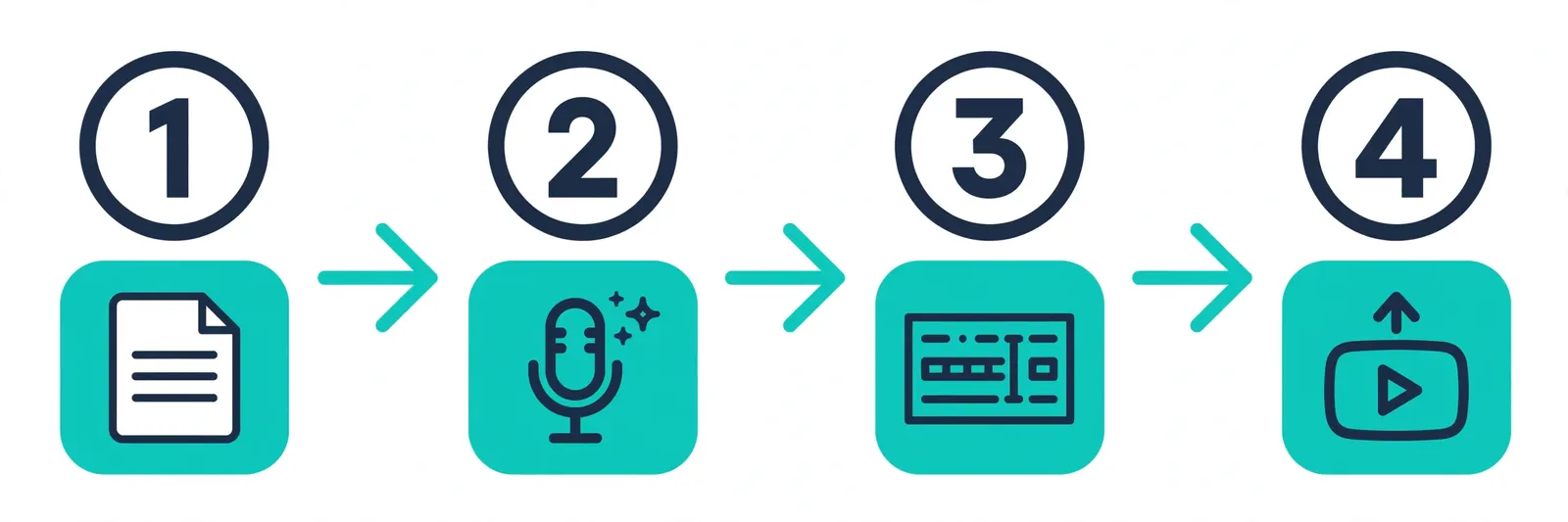
The tool is only half the battle. Here's the workflow that separates faceless channels that sound professional from ones that sound robotic:
- Write for the ear, not the eye. Short sentences. Contractions. Read your script aloud before generating — if you stumble, the AI will too.
- Pick one voice and marry it. Your voice is your channel's identity. Switching voices between videos confuses subscribers. Test 3–4 voices, pick one, never change it.
- Generate in chunks. Generate paragraph by paragraph instead of one giant block. This gives you pacing control and makes re-generating a single flubbed line cheap.
- Add human pauses in the editor. Insert 0.3–0.5 second gaps between sections. AI voices rarely pause naturally — you add the rhythm in post.
- Mix subtle background music. Low-volume music (around −20dB under the voice) masks minor robotic artifacts and massively increases watch time.
- Stay consistent across videos. Same voice, same pacing, same audio mix. Consistency is what makes viewers forget the voice is AI.
For vertical video specifically, our AI voiceover guide for YouTube Shorts covers pacing and hook timing for the first 3 seconds.
5. Voice Cloning: What's Possible Free + Consent & Safety
Voice cloning is the most requested feature in this space — and the most misunderstood. Here's the honest picture:
What's actually free: ElevenLabs Instant Voice Cloning — clone a voice from about a minute of audio, available even on the free plan within your character limits. Descript Overdub — clone your own voice with a short training recording; limited free AI-speech hours apply.
The consent rule (non-negotiable): only clone voices you own or have explicit written permission to use. Both ElevenLabs and Descript require consent verification during training — this isn't bureaucracy, it's what keeps the technology legal and your channel safe.
Safety notes most listicles skip:
- Never clone public figures, celebrities, or other creators — even as a "joke." It violates platform policies and can be illegal.
- YouTube requires disclosure when content contains realistic AI-generated voices (more on this below).
- Keep your training recordings private. Your voiceprint is biometric data — treat it like a password.
If you want the broader picture of what modern TTS can do beyond cloning, our AI text to speech generator page covers the core technology.
6. Can You Monetize AI-Voiced YouTube Videos?
Short answer: yes — YouTube does not ban AI-voiced content from the YouTube Partner Program. But there are rules, and channels get rejected when they ignore them:
- Originality matters, not the voice. YouTube's reused-content and spam policies target low-effort, mass-produced videos — not AI voices specifically. An AI-narrated documentary with original scripting, editing, and visuals can be monetized. A hundred auto-generated slideshow videos with stock footage likely won't be.
- Disclosure is required. YouTube's AI-generated content disclosure policy requires creators to disclose when they've created altered or synthetic content that appears realistic — including realistic AI voices. There's a checkbox in YouTube Studio when you upload. Use it.
- Advertiser-friendliness still applies. AI voice doesn't exempt you from the usual rules: no excessive profanity, no misleading content, no violent or hateful material.
- Practical tips: write original scripts (never just read Wikipedia aloud), add genuine editing value, disclose the AI voice, and keep your content in advertiser-friendly territory.
Bottom line: treat the AI voice as a production tool, like a camera or editing software. Channels fail monetization review because of lazy content, not because of the voice. You can generate your first narration free on our AI voice generator.
7. AI Voice Generators That Work Without Sign-Up
If you'd rather not create an account just to test a voice, a few generators genuinely work with no sign up. That said, "no login" almost always comes with a tradeoff — daily character caps, ads, or lower-quality voices. Here's how the main options stack up, as of this writing.
- TTSMaker — Reviewers describe it as working with no sign-up or credit card required. The free plan allows 20,000 characters per week with unlimited downloads and commercial use permitted. The catch: voices are serviceable rather than great, and the site is ad-supported.
- TextaVoice (PDFgear) — In its February 2026 launch announcement, PDFgear claimed TextaVoice offers text to speech with no sign-up, free and unlimited use, and permission for commercial use. Take these as the maker's claims rather than a guarantee; launch-day terms on new tools often change, so check the current limits before depending on it for a project.
- texttospeechh.com free TTS — Per the site's FAQ, the free text-to-speech tool requires no credit card and includes free MP3 download, with document import for PDF, DOCX, and TXT files up to long script lengths. The catch: like most free tools, supported text length depends on the selected voice engine, and commercial use depends on each voice provider's licensing terms.
- The common trap — Some tools advertise "no signup" for pasting text, then demand an account the moment you want to download an MP3. If downloads matter to you, confirm the MP3 export works before you write a long script.
For comparison, ElevenLabs' free tier (10,000 characters per month) requires an account — but that single sign-up buys you noticeably better voices and a larger quota than the no-login tools above.
Verdict: If zero friction is the priority and you need a quick voiceover without login, TTSMaker is the most proven no-sign-up option. But if you want the best free voices available, one signup is worth it — ElevenLabs' free tier leads on quality, and texttospeechh's free tool gives you document import plus free MP3 downloads. Ten seconds of signup buys a lot more output.
Create Your First AI Voiceover — Free
Turn your script into a natural-sounding AI voiceover for your next video, podcast, or online course. Pick a voice, paste your text, and download the audio — free to try, no signup needed.
Generate Your Voiceover →8. Frequently Asked Questions
Q1: What is the best AI voice generator with a free plan?
For voice realism, ElevenLabs (10,000 free characters/month). For unlimited free generation inside your editor, CapCut. For the biggest free character allowance, TTSMaker (20,000 characters/week). The "best" depends on whether you value quality, speed, or volume.
Q2: Is there a completely free AI voice generator with no sign-up?
Most full-featured tools require a free account. CapCut's TTS is free with a free account and has no monthly character cap, making it the closest to "completely free" for creators. Be wary of random no-signup sites — they often have hidden limits or unclear commercial-use terms.
Q3: Can I clone my voice for free?
Yes — ElevenLabs' Instant Voice Cloning works on the free plan (within your character limit), and Descript's Overdub lets you clone your own voice with limited free AI-speech hours. Both require a consent recording, and you should only ever clone your own voice or one you have written permission for.
Q4: Which AI voice generator sounds the most human?
In our September 2026 test, ElevenLabs scored 5/5 for realism — the only tool where emotional beats (whispers, excitement) sounded genuinely performed rather than rendered. Murf, Play.ht, Typecast, Descript, and Speechify all scored a strong 4/5.
Q5: Can I use free AI voices for commercial YouTube videos?
Usually yes, but check each tool's terms: most free tiers allow YouTube monetization, while some require attribution or restrict commercial use. YouTube itself allows AI-voiced content in the Partner Program as long as the content is original and you disclose the AI-generated voice on upload.
Related Guides
- 7 Free ElevenLabs Alternatives That Actually Work (2026)
- Best Free Text to Speech Tools Tested in 2026
- ElevenLabs v4: Try Expressive AI Voices Free
- Murf AI Free Alternative: 7 Best Picks (2026)
- Best AI Voices & Neural TTS Models 2026
- AI Voiceover Guide for YouTube Shorts
- AI Voice Cloning: Clone Your Voice Free (2026)
Sources & References
- W3C Web Accessibility Initiative — "Audio Content & Video Content" text-to-speech guidance: www.w3.org/WAI/media/av/av-content/
- Wikipedia — Speech Synthesis & Speech Recognition: en.wikipedia.org/wiki/Speech_synthesis
- van den Oord et al. — WaveNet: A Generative Model for Raw Audio: arxiv.org/abs/1609.03499
- Shen et al. — Natural TTS Synthesis by Conditioning WaveNet on Mel Spectrogram Predictions (Tacotron 2): arxiv.org/abs/1712.05884
- Google — Neural Text-to-Speech & AI Overview documentation: cloud.google.com/text-to-speech