
Quick Answer: Can I Make a Podcast With Free Text to Speech?
Yes — you can make a podcast with text to speech for podcast free tools, and many solo creators already do. The workflow is straightforward: write a script, generate the voiceover with a free TTS plan, stitch the audio together, export an MP3, and upload it to a podcast host. No microphone, no studio, and no budget required to get your first episodes out.
But not every "free" TTS tool is podcast-ready. Some block downloads, some forbid commercial use (which includes monetized podcasts), and some give you so little audio per month that one episode is impossible. This guide shows which free tools actually work for podcasting, how far each quota stretches in episode minutes, and the exact workflow from script to published episode.
1. The free tools that matter for podcasters
These are the realistic options at time of writing. For podcasting, the rules that matter most are download access and commercial rights — not just the character count.
TTSMaker — the weekly quota fits episodic publishing
TTSMaker's free plan offers 20,000 characters per week with unlimited downloads, and its own site and reviewers state commercial use is allowed — including podcasts. The weekly reset is the key detail: it maps naturally to an episodic schedule, so you get a fresh quota every week instead of running dry mid-month.
Twenty thousand characters per week is roughly 3,200–3,400 English words (as a rough estimate), which translates to about 18–20 minutes of audio. That comfortably covers one or two standard episodes per week for most solo creators.
ElevenLabs — great voices, small monthly allowance
ElevenLabs is the name most people know for realistic AI narration. Its free plan gives 10,000 characters per month (roughly 1,600–1,700 words, or about 9–10 minutes of audio) — enough for one short episode a month, tight for a real publishing cadence.
For realistic narration options, see our guide to realistic AI voice generators for narration and these ElevenLabs alternatives with free plans.
Listnr — built for podcasters, but the free tier is a trial
Listnr is podcast-specific: beyond voice generation, it offers hosting and distribution to Spotify and Apple Podcasts. But the free tier is a 1,000-word trial (about 6 minutes of audio, total), and paid plans start from $19/month. Treat the free tier as a test drive of a podcast platform, not a way to produce ongoing episodes.
Murf AI — honest verdict: not suitable for publishing
Murf AI's free plan gives you 10 minutes of voice generation in total — lifetime, not per month — with no downloads and no commercial rights. That means you cannot export the audio and you cannot legally publish it as a podcast. It works for previewing voices, but for podcasting, the free plan is a dead end. We are saying this plainly so you do not waste time.
Descript — mention as the editing side, not the voice source
Descript's free plan is permanent, but it is built for editing audio and video (including 1 hour of transcription), not for generating podcast voiceovers from scratch. Paid plans start from $16/month (Hobbyist). It is worth knowing about because many creators generate a voiceover elsewhere and edit in Descript — but it is not your free TTS pick.
TextaVoice (PDFgear) — new, with claims worth checking
TextaVoice, launched by PDFgear in February 2026, is the tool behind the recent wave of press coverage for this keyword. Its press release claims the tool is free and unlimited, requires no signup, allows commercial use, and exports MP3 files "ready for podcasts." These are the company's own claims — not independently verified at time of writing. Verify the current terms on the tool's own site before building episodes on it.
2. Compare: which free plan actually works for podcasting?
| Tool | Free quota | MP3 download | Commercial rights | Podcast fit |
|---|---|---|---|---|
| TTSMaker | 20,000 chars/week, unlimited downloads | Yes | Allowed (incl. podcasts) per its own site/reviewers | Best free fit — weekly reset matches episodic publishing |
| ElevenLabs | 10,000 chars/month | Yes | Check current terms | Good for testing, ~1 short episode/month |
| Listnr | 1,000-word trial | Yes (platform focus) | Paid plans primarily | Trial only; platform shines on paid plans from $19/mo |
| Murf AI | 10 min total, lifetime | No | No | Not suitable for publishing |
| TextaVoice | Claimed free/unlimited (company claim) | Claimed MP3 export | Claimed allowed | Promising but unverified — check terms |
| Descript | Free permanent plan (editing-focused) | Yes | Varies by plan | Editing tool, not a voice-generation pick |
3. How far does each free quota stretch? (episode-length planning)
Before you write a script, plan around your quota. A useful rough estimate: 800–900 English words ≈ 5 minutes of audio. Actual pacing varies with voice speed and pauses, so treat it as planning math, not a guarantee.
For a common 20-minute episode (about 3,200–3,600 words):
- TTSMaker (20,000 chars/week): roughly one 18–20 minute episode per week, free, indefinitely. This is the only plan on this list that supports a real weekly show.
- ElevenLabs (10,000 chars/month): roughly one 9–10 minute episode per month. A short monthly series is possible; a weekly show is not.
- Listnr trial (1,000 words): one ~6 minute test episode, ever. Use it to evaluate the platform.
- Murf AI (10 min total): one preview, no publishing.
Practical takeaway: match your episode length and cadence to the quota you have. Weekly publishing for free means ~3,000-word scripts on TTSMaker's weekly reset. Longer episodes need a paid plan or split production across tools — just keep the same voice across episodes, as covered below.
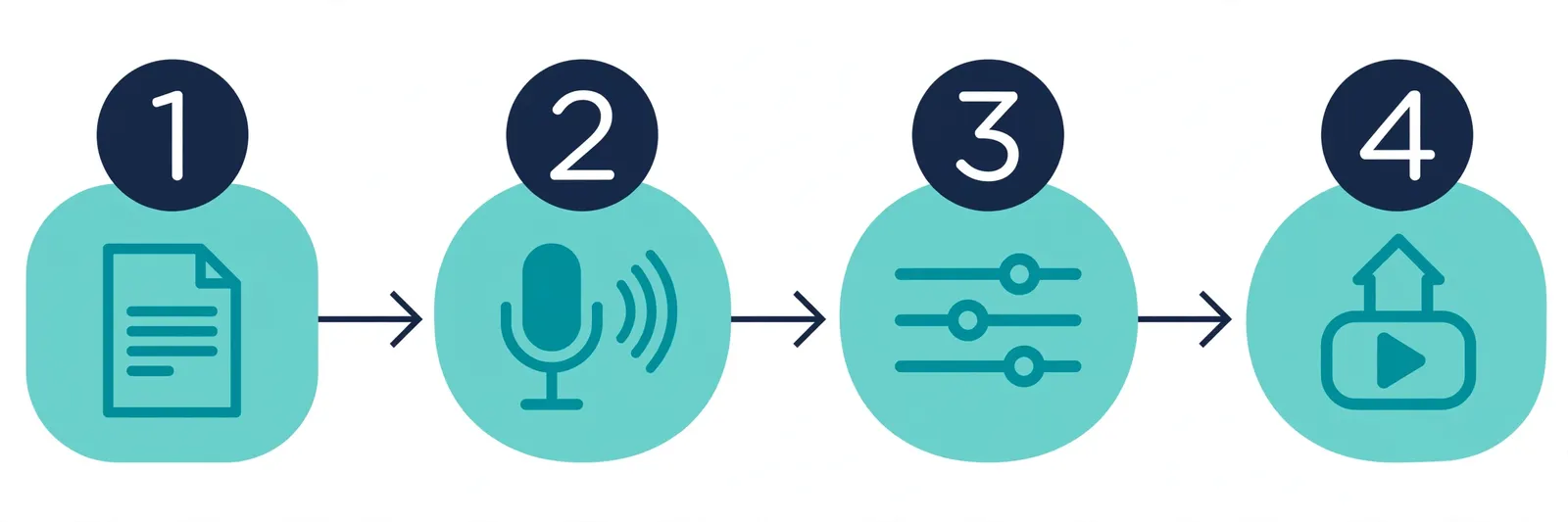
4. Your workflow: script to published episode
Here is the complete process, end to end, using only free tools.
1. Write a script built for listening
Write for the ear, not the eye: short sentences, plain words, explicit transitions ("First…", "Next…", "To wrap up…"). Read it aloud once — if a sentence is hard to say, rewrite it. Stay 10% under your quota to leave headroom for intro and outro.
2. Generate the voiceover in chunks
Free quotas make long scripts easier to handle in pieces. Split your script at natural breaks (intro, segment 1, segment 2, outro) and generate each chunk with the same voice and speed settings. Label files clearly (e.g., ep03-segment1.mp3). Chunking also makes fixes cheap: a typo in segment 2 means regenerating only segment 2.
3. Stitch the audio together in Audacity
Audacity is a free, open-source audio editor for Windows, Mac, and Linux. Import your chunks, drag them into order, and trim awkward pauses. Add intro/outro music on a separate track so you can lower its volume under the voice (Audacity has a built-in auto-duck effect for this).
4. Export a single MP3
Export your finished timeline as one MP3 at 128 kbps or higher — the standard format podcast hosts and directories expect.
5. Upload to a podcast host and publish
Important: TTS tools generate audio — they do not host podcasts. Upload your MP3 to a podcast host (free-tier options include Spotify for Creators and Podbean's free tier), which creates your RSS feed. Submit that feed once to each directory; every new episode then flows out automatically.
Ready to make your first episode?
Write your script, then generate your podcast voiceover free — pick a voice, paste your script, and download your episode audio.
Generate Your Podcast Voiceover Free →5. Frequently Asked Questions
Q1: Can I monetize a podcast made with free TTS?
Only if the tool's free plan grants commercial rights. TTSMaker's free plan allows commercial use including podcasts per its own site and reviewers; TextaVoice claims commercial use is allowed (unverified company claim); Murf AI's free plan explicitly does not. Re-check the tool's current terms before running ads or sponsorships, because terms change.
Q2: How long can a free TTS podcast episode be?
It depends on the quota. As a rough guide, TTSMaker's 20,000 characters per week supports about 18–20 minutes of audio weekly; ElevenLabs' 10,000 characters per month supports about 9–10 minutes monthly; Listnr's 1,000-word trial covers about 6 minutes once. Use the 800–900 words ≈ 5 minutes estimate to plan.
Q3: Do TTS tools host my podcast or create an RSS feed?
No. Text-to-speech tools generate audio files; they do not host podcasts or create RSS feeds (Listnr is the partial exception, offering hosting on paid plans). You upload your finished MP3 to a separate podcast host, which creates the RSS feed you submit to Spotify, Apple Podcasts, and other directories.
Q4: How do I keep the same voice consistent across episodes?
Use the same voice model, speed, and pitch settings in the same tool for every episode — and write them down. Switching tools or voices between episodes is the most common reason AI podcasts sound inconsistent, and listeners notice.
Q5: Can I add intro music and ads to a TTS podcast?
Yes. Generate the voiceover first, then assemble voice, music, and ad reads in a free editor like Audacity and export one MP3. If ad reads are also TTS-generated, confirm your tool's commercial terms cover advertising content.
Q6: Will listeners know the podcast is AI-voiced?
Modern TTS voices are very natural, but regular listeners may notice the lack of natural disfluencies, breaths, and emphasis shifts. Conversational scripts with varied sentence lengths and real pauses between segments go a long way. Some creators disclose AI narration in their show notes — a reasonable practice that builds trust.
Q7: What is the cheapest way to start a podcast with AI voice?
The genuinely free path at time of writing: write your script, generate the voiceover with TTSMaker's free weekly quota, stitch and edit in free Audacity, and publish through a free-tier podcast host. Your total cost is zero — the constraint is episode length per week, not money.
Making a podcast with free text to speech is absolutely doable: script, generate, stitch, export, publish. TTSMaker's weekly quota is the only free plan here that supports an ongoing show, ElevenLabs works for short monthly episodes, and Murf AI's free plan cannot be published at all. Pick the quota that fits your cadence, keep one consistent voice, and start publishing.
Related Guides
Sources & References
- W3C Web Accessibility Initiative — "Audio Content & Video Content" text-to-speech guidance: www.w3.org/WAI/media/av/av-content/
- Wikipedia — Speech Synthesis & Speech Recognition: en.wikipedia.org/wiki/Speech_synthesis
- van den Oord et al. — WaveNet: A Generative Model for Raw Audio: arxiv.org/abs/1609.03499
- Shen et al. — Natural TTS Synthesis by Conditioning WaveNet on Mel Spectrogram Predictions (Tacotron 2): arxiv.org/abs/1712.05884
- Google — Neural Text-to-Speech & AI Overview documentation: cloud.google.com/text-to-speech