
Quick Answer: Can You Dub Videos Into Any Language for Free?
Yes — and you have three real routes. YouTube's auto-dubbing does it free if you have access. Paid tools like ElevenLabs or HeyGen do it in one click but charge per minute. Or you go DIY: translate your script, generate the voice with a free TTS tool, and lay it under your video in any editor. That last route costs nothing but your time, and this guide walks you through it step by step.
The honest part most guides skip: free dubbing will not clone your voice or sync your lips. What it will do is put your video in front of viewers who never would have watched it otherwise — and for most creators, that is the part that actually matters.
Something shifted in the last few weeks. Google rolled AI dubbing into its ad tools so advertisers can clone one video ad into 33 languages. YouTube keeps expanding its auto-dubbing feature to more creators. And suddenly every tool from ElevenLabs to HeyGen is selling you the same dream: record once, reach everyone.
The pitch is real, but the price tags are steep — and most of the "free" options die at the paywall. So here is the honest walkthrough: how AI dubbing actually works, what you can genuinely do for free today, and the practical workflow that does not cost you anything.
1. What AI Dubbing Actually Is (and Isn't)
Dubbing is not subtitling. Subtitles leave your original audio intact and put text on screen. Dubbing replaces your voice track with a new one in another language — the video looks the same, but you are suddenly speaking Spanish.
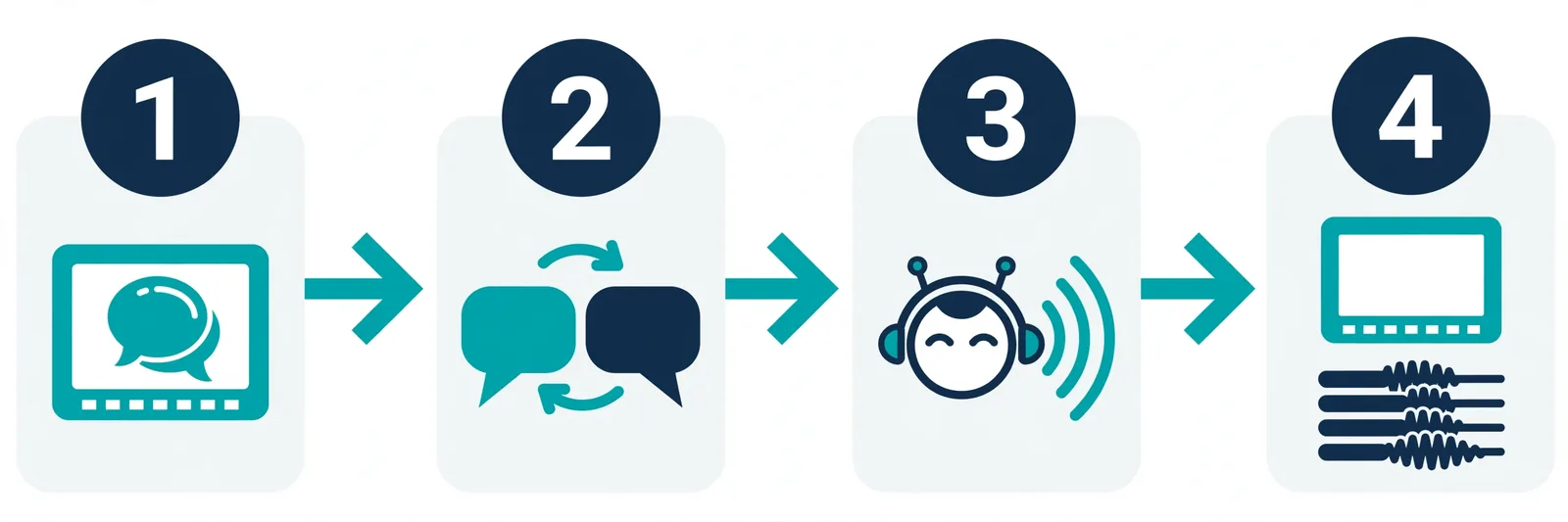
The pipeline has four steps, and every tool on the market does some version of this:
- Transcribe — speech-to-text pulls the words out of your audio.
- Translate — a language model converts the script to the target language.
- Voice — a TTS engine generates the new narration.
- Timing — the audio is stretched or compressed to fit the original video's timing.
Premium tools add a fifth step: lip-sync, which tweaks mouth movements to match the new words. That is where most of the magic (and most of the cost) lives. Skip it and you get a slightly "foreign film on TV" effect — voices that start and end at the right moments but do not perfectly match the lips. For YouTube tutorials, reviews, and explainers, that is usually fine. For drama or comedy, it isn't.
2. Your Options, Ranked by Price
The all-in-one paid route
ElevenLabs Dubbing, HeyGen, Rask AI. You upload a video, pick target languages, and get back a finished dub. Quality is impressive — HeyGen's avatar sync and ElevenLabs' voice cloning are genuinely good. But pricing starts in the tens of dollars per month with per-minute billing that eats through credits fast. Great if you are a business localizing real ad spend; overkill if you are a creator testing whether your audience even watches in Hindi.
YouTube's built-in auto-dubbing
YouTube has been quietly expanding automatic dubbing — it generates dubbed versions of your videos in multiple languages automatically. It costs nothing and requires zero work from you. The catch: it is rolling out gradually, you do not control which languages get dubbed, and the quality is serviceable, not spectacular. Still, if you already have a channel, check your settings — you might have it and not know. (YouTube Studio → Settings → Defaults, or check the auto-dubbing docs for current eligibility.) Making short-form too? Our AI voiceover guide for YouTube Shorts covers the voice side of that workflow.
The DIY free route — where you control everything
This is the route I would actually recommend to a creator on a budget, and it doubles as the practical tutorial for this article:
- Transcribe your video. YouTube's own captions, a free Whisper tool, or even CapCut's auto-captions. Export the text.
- Translate it. Any translation tool you trust. Then — and this is the step everyone skips — have a native speaker (or a careful re-read) fix the machine translation. Machine-translated Hindi that sounds like it was written by a textbook will tank your watch time. Ten minutes of human review beats any model upgrade.
- Generate the voice. This is where a free TTS tool like TextToSpeechH earns its place: paste the translated script, pick a voice that fits the target language, and export the MP3. No signup, no character caps on the free side that stop you mid-video. Not sure which voice to pick? Our best AI voices guide compares the top neural models so you can shortlist. For a full walkthrough of voice quality expectations, see our free TTS tools roundup.
- Drop it into your editor. CapCut, DaVinci Resolve (free), or anything you already use. Mute the original dialogue, lay the dubbed track underneath, and adjust speed slightly where timing drifts. 0.9x–1.1x speed adjustments are invisible to viewers.
- Upload as a separate track or a separate video. If your audience is concentrated in one extra language, a dedicated upload often performs better than a multi-audio-track video.
The open-source rabbit hole
GitHub has free, self-hosted dubbing projects that combine Whisper transcription, translation, voice cloning, and lip sync in one pipeline — free forever, running on your own hardware. They are genuinely powerful. They are also command-line tools that expect you to debug dependency errors on a Tuesday night. If that sentence made you smile, go explore. If it made you tired, stick with the DIY route above.
3. What Quality Should You Actually Expect?
Let us set expectations honestly, because the marketing won't:
- Short, clear speech dubs best. Tutorials, listicles, commentary. Fast banter, overlapping speakers, and music-heavy audio dub poorly.
- Romance languages are easy; others vary. English→Spanish is nearly flawless. English→Hindi, Japanese, or Arabic is good and getting better, but quirks happen — which is why step 2's human review matters.
- Your voice won't be perfectly cloned for free. Free tiers generate a natural-sounding voice in the target language, not an exact replica of yours. Some viewers prefer that anyway — a voice that clearly belongs to the language feels less uncanny.
- AI disclosure matters. YouTube and most platforms expect you to disclose AI-manipulated audio. Mark it in the description or settings. It takes five seconds and protects your channel.
4. Frequently Asked Questions
Q1: Can I dub videos for free with AI?
Yes. YouTube's auto-dubbing is free if you have access, and the DIY route (translate → free TTS → edit) costs nothing except your time. Fully automated one-click dubbing is where the paid tools live — you are trading convenience for money.
Q2: What's the best free AI dubbing tool?
There is no single winner yet. For hands-off: YouTube auto-dubbing. For control: the DIY workflow with a free TTS tool like TextToSpeechH for the voice track. For technical users: open-source pipelines on GitHub. The honest answer is that "best" depends on how much work you want to do.
Q3: Is AI dubbing better than subtitles?
For retention, usually yes — viewers who can listen in their language watch longer than viewers who must read in it. Subtitles are cheaper and faster to produce though. If you are testing a new market, start with subtitles, and dub the videos that perform.
Q4: Does AI dubbing work for YouTube monetization?
The dubbed audio does not change monetization status by itself. You must still own the rights to the original video, and you should disclose the AI voice per YouTube's policies. Re-uploading someone else's video with an AI dub is not a business model; it is a copyright strike waiting to happen.
Q5: Can I clone my own voice for the dub?
Voice cloning from a short sample exists (several paid tools offer it), but it comes with consent requirements and, in most cases, watermarks identifying the audio as AI-generated. For most creators, a good natural voice in the target language works fine — and it sidesteps every cloning concern.
Dub your first video today
The best way to find out if dubbing works for your audience is to dub one video and watch the numbers. Paste your translated script into TextToSpeechH, pick a voice in the target language, and download the MP3 — free, no signup. If your foreign-language viewers start watching longer, congratulations: you just unlocked a whole new audience without hiring a voice actor.
Try TextToSpeechH FreeRelated Guides
Sources & References
- W3C Web Accessibility Initiative — "Audio Content & Video Content" text-to-speech guidance: www.w3.org/WAI/media/av/av-content/
- Wikipedia — Speech Synthesis & Speech Recognition: en.wikipedia.org/wiki/Speech_synthesis
- van den Oord et al. — WaveNet: A Generative Model for Raw Audio: arxiv.org/abs/1609.03499
- Shen et al. — Natural TTS Synthesis by Conditioning WaveNet on Mel Spectrogram Predictions (Tacotron 2): arxiv.org/abs/1712.05884
- Google — Neural Text-to-Speech & AI Overview documentation: cloud.google.com/text-to-speech